When the Server Deploys, Slack Notifications with Deployment Results and Commits? with AWS CodePipeline
When the server deploys, let developers know the deployment results with a click.
This post has been translated from Korean to English by Gemini CLI.
This article was written while implementing a way to easily check server deployment results in the project. If you have any incorrect content or other methods, please leave a comment or contact me at joyson5582@gmail.com!
Currently, our team is deploying servers using AWS CodePipeline. To know if the deployment was successful, we had to directly check the AWS Console. (Of course, you can also find out by going into Grafana, but to know clearly, you had to go into the Console.)

(Very annoying…)
It would be great if we could check it directly in Slack (Discord), which we use frequently 🙂
We can solve this by creating a function using AWS Lambda and SNS. Then, let’s briefly learn about SNS and Lambda and then proceed with a brief explanation of the code.
SNS
This is not the SNS we commonly know. It stands for SNS (Simple Notification Service) and is a service that manages message delivery and transmission to subscribed services and users.
- Consists of Topic and Subscribe. -> Sends messages to subscribers who subscribe to a topic.
That is, it can be understood as creating a topic and specifying a service that subscribes to it, then sending a message to that service. (Push method)
And, AWS CodePipeline provides a convenient function to create SNS in Advanced - Triggers.

As such, you can create it to match various events. We will use deployment success / failure.
Lambda
Trigger

As you can see, it appears in Add Trigger. Let’s add the SNS trigger created in CodePipeline.
1
def lambda_handler(event, context):
Lambda basically provides event and context.
Event
This is the event information called when the function is executed.
1
2
3
4
5
6
7
8
9
10
11
12
13
14
15
16
17
18
19
20
21
22
23
24
25
26
27
28
29
30
31
32
33
{
  "Records": [
    {
      "EventSource": "aws:sns",
      "EventVersion": "1.0",
      "EventSubscriptionArn": "arn:aws:sns:ap-northeast-2:123456789012:ExampleTopic:abcdefgh-1234-5678-abcd-1234567890ab",
	  "Sns": {
		"Type": "Notification",
		"MessageId": "82c10928-69a4-5aec-9701-************",
		"TopicArn": "arn:aws:sns:ap-northeast-2:843255971531:2024-corea-backend-deploy-notification",
		"Subject": "SUCCEEDED: AWS CodeDeploy d-JHPM9HBC8 in ap-northeast-2 to 2024-corea-backend-deploy",
		"Message": {
		  "region": "ap-northeast-2",
		  "accountId": "843255971531",
		  "eventTriggerName": "2024-corea-backend-dev-trigger",
		  "applicationName": "2024-corea-backend-deploy",
		  "deploymentId": "d-JHPM9HBC8",
		  "deploymentGroupName": "2024-corea-backend-develop-group",
		  "createTime": "Fri Nov 01 06:14:33 UTC 2024",
		  "completeTime": "Fri Nov 01 06:15:13 UTC 2024",
		  "deploymentOverview": {
			"Succeeded": 1,
			"Failed": 0,
			"Skipped": 0,
			"InProgress": 0,
			"Pending": 0
		  },
		  "status": "SUCCEEDED",
		  "creator": "user"
		},
    }
  ]
}
As such, you can see EventSource and the information provided by the event source, which indicates which event triggered the call. Since SNS was used, SNS provides additional values.
We receive topics for deployment success / deployment failure.
- Which application was executed (applicationName)
- Which deployment group was executed (deploymentGroupName)
- When it started (createTime) and when it completed (completeTime)
- Whether it succeeded (status)
- Information about successful instance and deployment (deploymentOverview)
Context
1
2
3
4
5
6
7
8
9
10
11
12
13
14
LambdaContext(
    aws_request_id = e1e8aaff-227c-****-****-fe102f35fb93,
    log_group_name = /aws/lambda/2024-corea-deploy-notification-lambda,
    log_stream_name = 2024/11/02/[$LATEST]14c92f21****41cebb****8f13e7f8,
    function_name = 2024-corea-deploy-notification-lambda,
    memory_limit_in_mb = 128,
    function_version = $LATEST,
    invoked_function_arn = arn:aws:lambda:ap-northeast-2:843255971531:function:2024-corea-deploy-notification-lambda,
    client_context = None,
    identity = CognitoIdentity(
        cognito_identity_id = None,
        cognito_identity_pool_id = None
    )
)
This is an object that contains information related to the environment when the Lambda function is executed. -> Used to log function execution results and process them more finely. (Provides allocated memory, function name, function version, etc.) This is not immediately necessary, so I will skip it.
Code
Now let’s write the code. (Actually, this part is the core 🙂)
1
2
3
4
5
6
7
8
9
10
11
12
13
14
15
16
17
18
19
20
21
22
23
def lambda_handler(event, context):
    # Set Slack Webhook URL
    webhook_url = "***"

    message_dict = json.loads(event['Records'][0]['Sns']['Message'])

    # Extract SNS message
    deploymentId = message_dict.get('deploymentId')
    createTime = message_dict.get('createTime')
    completeTime = message_dict.get('completeTime')
    deployGroup = message_dict.get('deploymentGroupName')
    status = message_dict.get('status')
    application_name = message_dict.get("applicationName")

    status_message = ":white_check_mark:" if status == "SUCCEEDED" else ":x:"
    overview_dict = json.loads(message_dict['deploymentOverview'])
    siteUrl = "https://dev.code-review-area.com" if deployGroup == "2024-corea-backend-develop-group" else "https://code-review-area.com"
    deployment_duration = diff_time(createTime, completeTime)

    success_count = overview_dict.get('Succeeded', 0)
    failure_count = overview_dict.get('Failed', 0)
    in_progress_count = overview_dict.get('InProgress', 0)
    pending_count = overview_dict.get('Pending', 0)
I made it fetch information like this. There are also parts that are directly converted to Slack, which are the information explained above. - ":white_check_mark:" if status == "SUCCEEDED" else ":x:"
1
2
3
4
5
6
def diff_time(create_time, complete_time):
    create_time = datetime.datetime.strptime(create_time, "%a %b %d %H:%M:%S UTC %Y")
    complete_time = datetime.datetime.strptime(complete_time, "%a %b %d %H:%M:%S UTC %Y")

    deployment_duration = complete_time - create_time
    return deployment_duration.total_seconds()
I measured the time taken by subtracting the start time from the completion time, like Sun Sep 01 13:13:26 UTC 2024 - Sun Sep 01 13:12:48 UTC 2024.
I will omit the part that creates the message to send to Slack, as I think it’s unnecessary.

(It’s too long, and it’s important to create it to fit each team 🙂)
1
2
3
4
5
6
7
    http = urllib3.PoolManager()
    response = http.request(
        'POST',
        webhook_url,
        body=json.dumps(slack_message).encode('utf-8'),
        headers={'Content-Type': 'application/json'}
    )
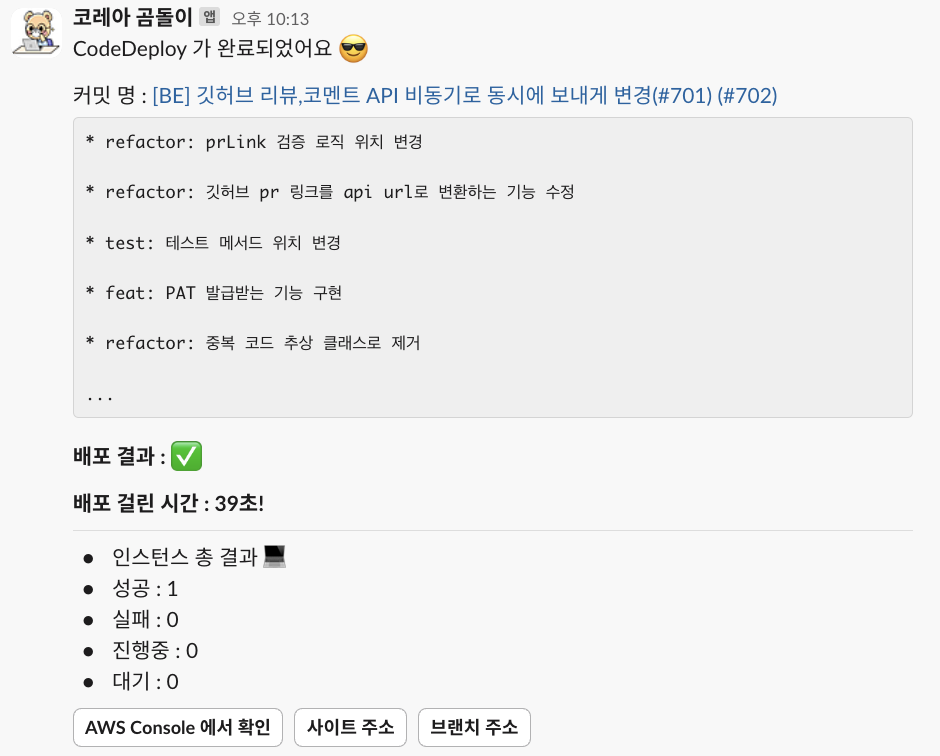
Finally, if you send a request, it goes to Slack like this!

End..?
If it’s like this, you’ll feel a bit disappointed. It tells you the essential go to result, number of deployed instances, deployment result, etc., but it would be better if you knew what source the deployment was made from. (To solve the problem of the deployment succeeded, but what kind of deployment is this..? ☺️)
I will add detailed information through an API called BOTO3.
BOTO3
Boto3 is AWS SDK for Python, a library.
- Official documentation: https://boto3.amazonaws.com/v1/documentation/api/latest/index.html
Why Boto? It is said to be named after the freshwater dolphin that inhabits the Amazon River..
1
codepipeline = boto3.client('codepipeline')
This creates a client that can access the service.
Since the official documentation is well-written for each service, you can find and use the necessary API here. codepipeline API documentation


Adding Code
1
2
3
4
5
6
7
8
9
10
11
12
13
14
15
16
17
18
19
20
21
22
23
24
25
26
27
28
29
30
31
32
33
34
codepipeline = boto3.client('codepipeline')

try:
	# Get pipeline state
	pipeline_state = codepipeline.get_pipeline_state(name=pipeline_name_mapping.get(deployGroup))

	for stage_state in pipeline_state['stageStates']:
		if stage_state['stageName'] == 'Source':
			for action in stage_state['actionStates']:
				if 'currentRevision' in action:
					commit_id = action['currentRevision']['revisionId']
					summary = action['latestExecution'].get('summary', "No summary available")
					entity_url = action.get('entityUrl', "No entity URL available")
					revision_url = action.get('revisionUrl', "No revision URL available")

					# Separate summary into title and summary, set to empty string if github_commit_summary is not available
					github_commit_title, separator, github_commit_summary = summary.partition("\n\n")
					if not github_commit_summary:
						github_commit_summary = ""  # Assign empty string if summary is not available

					# Limit summary to a maximum of 10 lines
				summary_lines = github_commit_summary.splitlines()[:10]  # Get only the first 10 lines
				if len(summary_lines) == 10 and len(github_commit_summary.splitlines()) > 10:
					summary_lines.append("...")  # Add ellipsis if more than 10 lines
				github_commit_summary = "\n".join(summary_lines)
					# separator is always "\n\n", so use it to separate title and summary.

					# Output (or perform additional operations)


except codepipeline.exceptions.PipelineNotFoundException:
	print(f"Pipeline '{pipeline_name}' not found.")
except Exception as e:
	print(f"Error occurred: {str(e)}")
- Commit ID: GitHub commit ID - Not used right now, but it might be possible to create a rollback button directly in the future..?
summary: GitHub commit content Below,
[BE] GitHub ...and* refactor : ...are information like this.
- entityUrl: Applied branch link
- revisionUrl: Commit link
I extracted these. (Others were judged unnecessary as they represent the status of each stage of the Pipeline.) Additionally, to prevent it from getting too long, I limited it to 10 lines.

As a result, we can now check two results without directly checking the server deployment.
- Based on which commit the server was deployed
- Whether the server deployment was successful on the instance, time taken, etc.
Additionally, to perform the pipeline status query logic, the IAM executing Lambda needs
codepipeline:getPipelineStatepermission! (Thanks to Tommy for readily adding it ☺️☺️)
Thank you!
```